Your 15-minute agenda
Minutes 0–2: confirm scope and data completeness. Minutes 2–5: read compatible totals. Minutes 5–8: investigate the largest meaningful difference. Minutes 8–11: reconcile customer quality. Minutes 11–13: choose one next step. Minutes 13–15: save the review, assign an owner and set the next check.
1. Fix the scope before reading the charts
Write the advertiser account, campaign scope, currency and account timezone at the top. Select a completed week and a comparable earlier period. Keep current-day data out of a settled weekly comparison and note holidays, promotions or website changes.
Record the conversion action and date basis. Google Ads attribution and business payment dates need not align. If customers normally convert days after clicking, mark the recent week as provisional and revisit it after the appropriate delay rather than presenting a premature CPA as final.
2. Start with totals that answer a business question
Show spend, clicks, the intended conversion count and, where available, verified qualified leads or customers from the business system. Present conversion value with its definition: assigned value, revenue and contribution are different quantities.
Calculate period rates from compatible totals. Do not average daily CPA or click-through rates when the days have different denominators. When conversions are zero, CPA is not a meaningful finite number; when conversions are unavailable, show unavailable rather than zero.
| Hypothetical completed period | Spend | Clicks | Verified enquiries | Cost per enquiry |
|---|---|---|---|---|
| Previous week | 2,400 SEK | 120 | 8 | 300 SEK |
| Review week | 3,000 SEK | 150 | 10 | 300 SEK |
| Change | +25% | +25% | +25% | Unchanged |
3. Explain the example instead of overselling growth
In the hypothetical table, spend and enquiries rose at the same rate. More enquiries do not show an efficiency improvement: cost per enquiry stayed 300 SEK. Whether the additional volume is useful depends on qualification, closing rates and available capacity.
If only four of the ten enquiries have been reviewed by sales, do not call all ten qualified. Record the missing follow-up and when it should be resolved. A payment report can provide business context, but it does not prove that every payment was caused by advertising.
4. Use a few charts with visible definitions
Use a daily spend chart to explain pacing and a conversion trend to show timing. Put campaigns or search themes in a ranked table when that makes the comparison clearer. Give every chart its dates, unit and source; keep different currencies and grains separate.
Avoid drawing a connected line across days with missing data or filling unavailable conversions with zero. A chart with incomplete coverage should say so. An account total and its campaign rows are two views of the same spend, not values to add together.
5. End with a short decision log
Choose one or two evidence-backed actions. For example: investigate a mobile form failure; review one irrelevant search theme; or leave settings unchanged while delayed conversions mature. Record why, who owns the work, whether approval is needed and the next check date.
The printable checklist is a review aid, not an automatic account change. Screenshots from a product walkthrough illustrate where to inspect a report; they are not proof of the hypothetical figures in this lesson.
- Account, dates, currency, timezone and conversion definition stated.
- Coverage, conversion delay and tracking changes disclosed.
- Totals and ratios reconciled; no mixed-currency or duplicate totals.
- Charts have source, units and honest gaps.
- Lead/customer quality checked where business records permit.
- Each proposed change has an owner, exact scope and required approval.
6. Follow the review in MRKTBL
Open the website project in Chat. Ask: “Prepare and save a Google Ads report for my selected campaign for the previous complete Monday–Sunday week, in account timezone. Compare the preceding week. Show spend, clicks and the purchase conversion action, flag missing data and conversion delay, and recommend one next step without changing ads.” Supply the connected account and campaign if asked. This example prompt is instructional; it is not a submitted chat or an advertiser result.
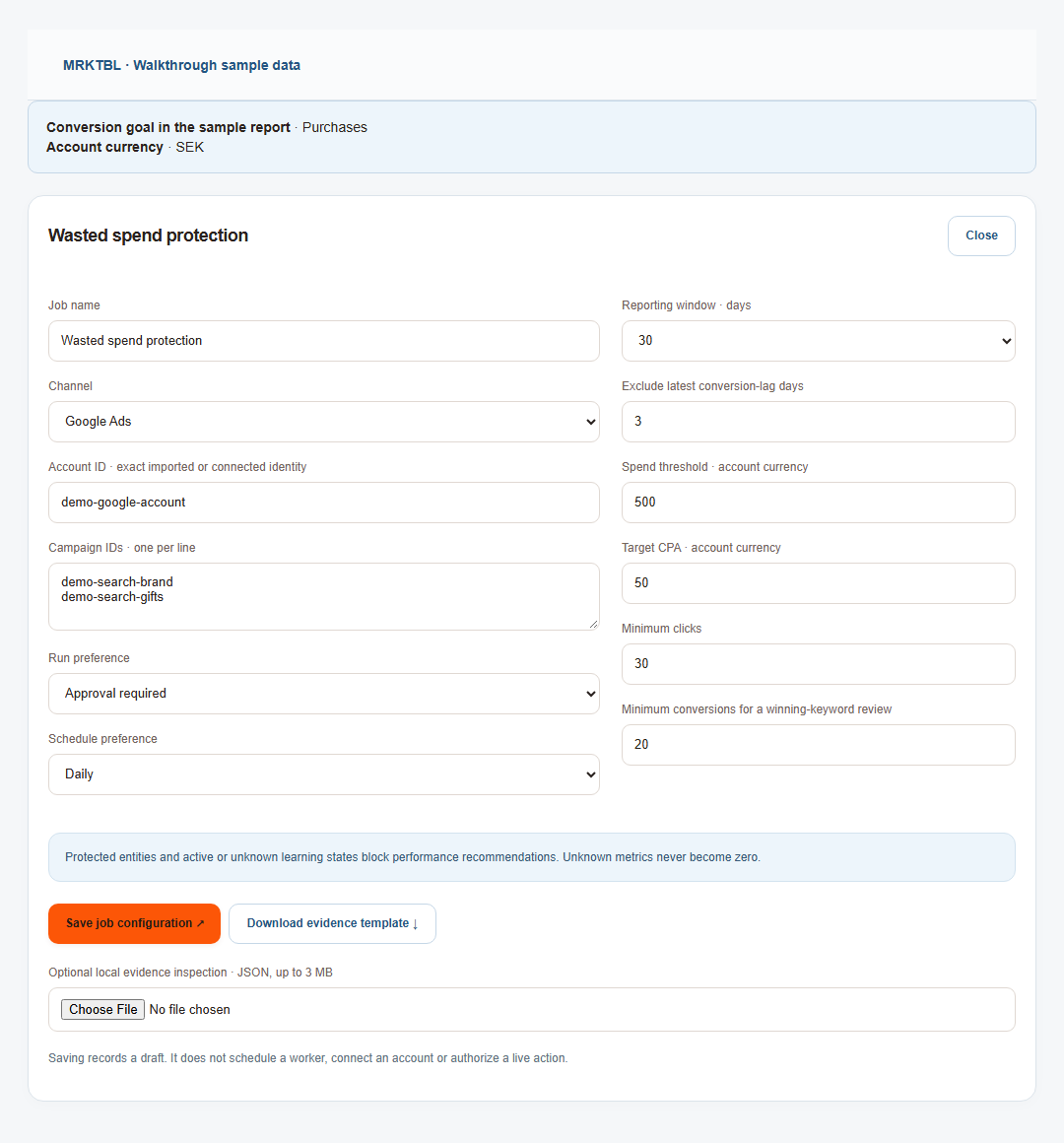
Read the returned report and its source scope. Open Reports to revisit a report that was actually saved; a chat reply alone may not create an archive item. Use Ask chat for a report or Set up weekly reviews where shown. The screenshots below use the separate, fictional wasted-spend walkthrough to illustrate review settings and evidence.
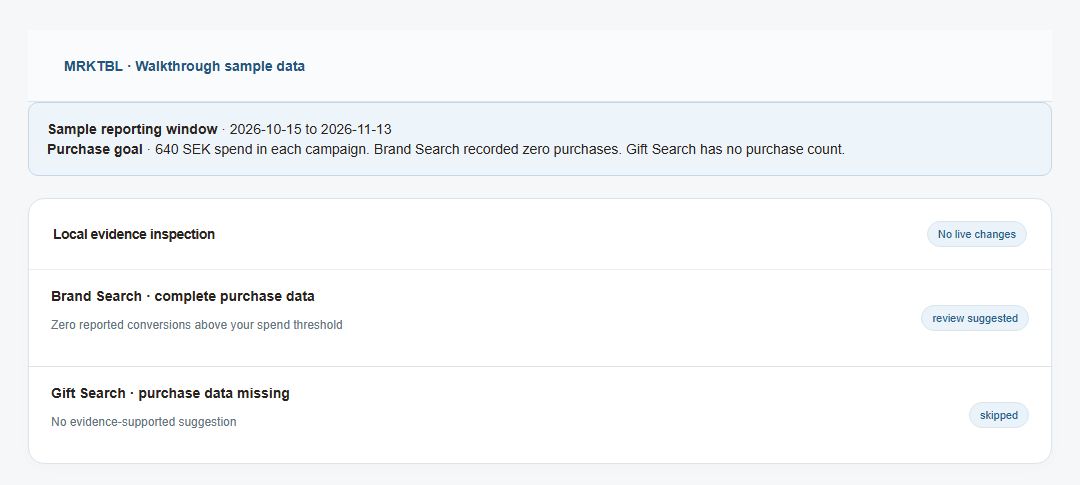
Inspect the evidence before accepting a finding. The second screenshot is from the separately labeled sample wasted-spend walkthrough: complete zero-purchase evidence produces a review suggestion, while missing purchase data is skipped. Both screenshots are labeled walkthrough sample data; neither shows a real advertiser outcome.
For repeat reviews, ask Chat to prepare the exact supported weekly reporting schedule and review it under Agents. Confirm account, dates, timezone, delivery and authority before approving. A saved preference is not proof that a scheduled run or email delivery succeeded. Check the run and delivery receipts; stopping an agent prevents future permitted work.
Common questions
Should a weekly report always trigger an optimization change?
No. A review can conclude that the data is incomplete, delayed or consistent with the plan. Waiting with a documented reason is often more useful than changing settings without a defensible hypothesis.
Can I compare Google Ads purchases directly with Stripe payments?
Use them as separate views with stated definitions. Dates, consent, attribution, renewal treatment and refunds can differ. Reconcile the business outcome before interpreting differences as errors or incremental sales.
Sources and further reading
Official guidance supports the underlying channel or measurement topic. It does not verify MRKTBL integration or predict performance.
Turn your learning into a plan.
Discuss your business, compare ideas and review supported actions in MRKTBL. Account permissions, actual data and separate approval determine what can be executed.
Explore workspace features →